

Advanced Search
One search page for every monday.com board. Ask it in plain words.
Advanced Search adds a search page to your monday.com account. Type a question and AI writes the query, shows it to you and runs it. Or pick filters, or write the query yourself. It follows links between items, searches subitems and records what changed from the day a board is indexed. Each person sees only the items they can already open in monday.
Get early access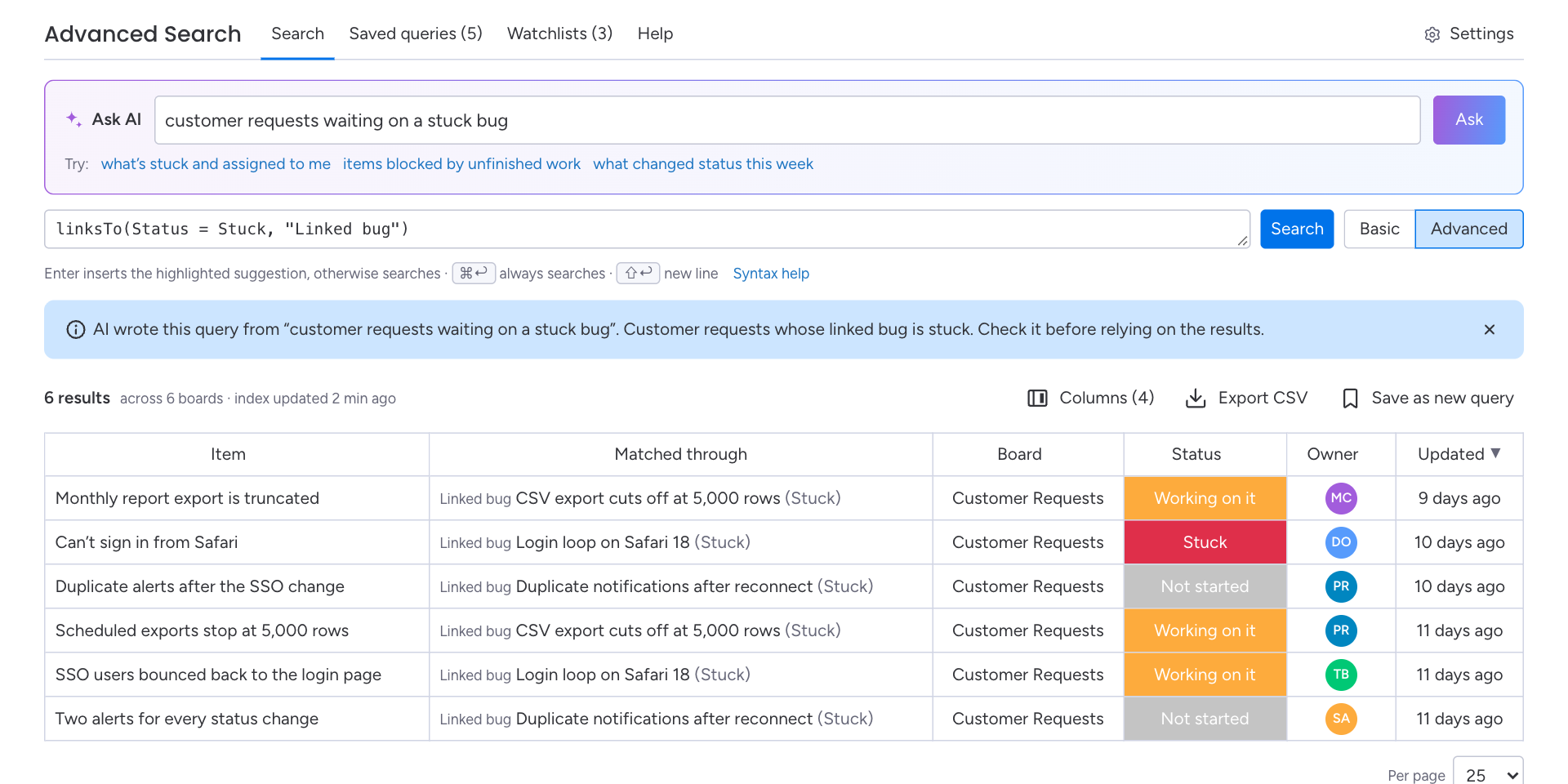
- Ask AI on every plan, with the query shown so you can check it
- Only what each person can open in monday, in every result, count and export
- Free for 1–3 seats, then $1 per seat per month
Ask a question. Get a query you can read.
Ask AI turns a question in plain words into a search over all your boards, and leaves the query in front of you.
1. Ask
Type a question the way you would ask a colleague, such as “customer requests waiting on a stuck bug”.
2. Check the query
AI writes the query, puts it in Advanced mode with a note saying AI wrote it, and runs it. Read it before you rely on the results.
3. Keep it
It is an ordinary query: change it, save it, share it or watch it. It runs with your own access, like every search.
What the AI sees
Your question, the names of the fields, boards and workspaces you can open, and the labels of status columns. Never item names, column values or people. Ask AI uses Anthropic’s Claude. Each account has a monthly Ask AI allowance; if it runs out, Ask AI pauses until the next month and every other way of searching keeps working.
Questions a board view can’t answer
One page over every board your account indexes, including how items link, their subitems, and what changed.
Basic and Advanced
Pick filters, or write the query out.
Basic mode is a row of filters: board, status, people, text, and + More for any other column on any indexed board. Each filter opens a picker that suits the column, like status labels, people with “Me”, or dates in the last N days.
Advanced mode is the same search as text, the way you would write JQL in Jira: AND, OR, NOT, parentheses, relative dates and ORDER BY. Suggestions appear as you type.
Linked items and dependencies
Follow links across boards.
linksTo and linkedFrom follow connected-board columns. blockedBy and blocks follow dependency columns. Name one column to follow only that one, count matches with linkedCount, or follow links up to three levels away.
A Matched through column shows the linked item that made each result match.
Subitems
Subitems are results too.
Search subitems directly, or through their parent. subitemOf finds subitems of matching items, parentOf finds items with a matching subitem, and allSubitems finds items whose subitems all match.
Parent and Item type can be shown as result columns, so you can tell at a glance what you are looking at.
History
Ask what changed.
From the day a board is indexed, Advanced Search records changes to status, dropdown, people, date, number and checkbox columns and to item names. Ask what changed with CHANGED FROM … TO … AFTER, or what something used to be with WAS.
History starts when a board is indexed. A condition about earlier dates finds nothing rather than guessing.
Watchlists
Get the search instead of running it.
Watch a saved search daily or weekly, at an hour in your own time zone. Each run compares with the one before and lists what is new and what changed, and monday notifies you when there is something to see.
Digests run with your own access, so they only list items you can open. Nobody else is notified.
A query language that reads like JQL
If your team has used Jira, this will look familiar. If not, Ask AI and the filters write it for you.
Filters, written out
Status IN (Stuck, "Working on it") AND Owner = currentUser() ORDER BY "Due date"The same search the filter bar builds, with OR, NOT and parentheses when you need them.
Linked items
linksTo(Severity IN (Critical, High) AND Status != Done, "Linked bug")Customer requests whose linked bug is severe and not done yet.
Dependencies
blockedBy(Status != Done) ORDER BY "Due date"Work held up by something unfinished, soonest due first.
Subitems
allSubitems(Status = Done)Items whose subitems are all done, at every level.
History
Status CHANGED FROM "Working on it" TO Stuck AFTER -30dWhat got stuck in the last 30 days.
Counts
linkedCount(Status = Stuck) >= 2Items linked to two or more stuck items.
The rest of the toolkit
Included on every plan.
Saved and shared queries
Save a search, share it with your account and copy a link to it. A shared query opens only for people who can open every board it uses.
Daily or weekly digests
Watch up to 1,000 saved searches each. A digest lists up to 25 new or changed items, and the first run records a baseline instead of calling everything new.
Result columns
Show any field as a column, including Parent and Item type, and sort by clicking a header. Your choice is remembered.
CSV export
Download up to 2,000 rows with the columns on screen. Only items you can open are included.
Fields across boards
Join columns that mean the same thing, like Owner on one board and Assignee on another, so one condition searches both. Admins confirm the suggestions.
Up to date
The index updates when monday reports a change, with a check every 15 minutes for anything missed. Each search shows when the index was last updated.
Guided setup. The person who connects the app chooses the boards to search, watches them index, confirms the suggested fields and tries a first search built from your own boards.
Built around monday permissions
A search app sees a lot. Here is how Advanced Search keeps it to what each person is allowed to see.
Only what you can open
Every search is checked with monday using the searching person’s own access. Results, counts, linked items, exports and digests leave out anything that person can’t open.
Reads, never changes
Advanced Search never changes your items, columns or boards. It adds change notifications to indexed boards and sends watchlist notifications, and nothing else.
Hosted in the EU
The app runs on Clever Cloud in Paris, France, with data encrypted at rest. When your account uninstalls it, all of the account’s data is deleted within 10 days.
Read the Privacy Policy and Terms of Service for Advanced Search.
Pricing
$1 per seat per month, and free for monday.com accounts with 1–3 seats. Every plan includes every feature, Ask AI included, and starts with a 14-day free trial.
| Your monday.com account | Per month |
|---|---|
| 1–3 seats | Free |
| 4–5 seats | $5 |
| 6–10 seats | $10 |
| 25 seats | about $22 |
| 50 seats | about $39 |
| 100 seats | about $74 |
| 500 seats | about $289 |
| 1,000 seats | about $599 |
Larger accounts get monday.com’s usual volume discounts, so prices above 10 seats are approximate. monday.com shows the exact price for your account size at checkout.
Your seat count is the number of seats on your monday.com account.
Billing, invoices and VAT are handled by monday.com. You pay through your monday.com account, monthly or yearly.
On every plan: up to 1,000 boards per account, and up to 1,000 saved queries and 1,000 watchlists per person.
Frequently Asked Questions
Is Advanced Search available yet?
Not yet. It is coming soon to the monday.com marketplace. Email product@orbiscend.com if you would like early access.
What does Ask AI see?
Your question, the names and types of the fields you can search, the names of the boards and workspaces you can open, and the labels of status columns. Never item names, column values or people. Ask AI uses Anthropic's Claude, and the query it writes runs with your own access.
Do I have to learn the query syntax?
No. Ask AI and the filter bar cover most searches, and anything you build with filters can be shown as a query with one click. The syntax is there for OR, NOT, groups, linked items and history, and for people who already write JQL.
Will people see items they can't open in monday?
No. Every search is checked with monday using the searching person's own access, so results, counts, CSV exports and watchlist digests only include items that person can open. Two people can run the same search and see different results.
How far back does history go?
To the day a board is indexed. From then on the app records changes to status, dropdown, people, date, number and checkbox columns and to item names. It can't fill in what happened before the board was indexed.
Does the app change anything in monday?
It never changes your items, columns or boards. It adds change notifications (webhooks) to the boards it indexes so search stays up to date, and sends a monday notification to the owner of a watchlist when their digest has changes.
Where is our data stored?
On Clever Cloud in Paris, France (EU), in a database encrypted at rest. When your account uninstalls the app, all of its data is deleted within 10 days.
How much does it cost?
$1 per seat per month, free for monday.com accounts with 1–3 seats, with a 14-day free trial. Every plan includes everything, Ask AI included. You pay through your monday.com account.
New to Advanced Search?
The guide walks through installing, connecting your boards and every way to search.